 Suresh Venkat
Most web teams have modernized how they ship code. Pull requests, CI pipelines, automated tests and repeatable deployments are normal now. Content often still moves differently. It lives in a CMS database, gets edited directly in production, and drifts away from what developers see on their laptops. When a release needs new templates and new content at the same moment, teams fall back on content freezes, double entry, or late-night "we'll fix it in prod" publishing.
DevContentOps is the name for closing that gap. This guide defines the term, explains the core workflow, gives a vendor-neutral checklist for evaluating platforms, and suggests a practical first 90 days.
DevContentOps Working Definition
We describes DevContentOps as "bringing content management into the DevOps process" (DevContentOps Explained). Put another way, the CMS and the people who use it become part of the continuous integration and delivery pipeline rather than a separate system that sits beside it.
The CrafterCMS (a headless CMS built on Git as the content repository) documentation offers a complementary definition: DevContentOps is "a set of tools and processes that allow teams of software developers, content authors, and system administrators to work together on a single project across multiple environments" (CrafterCMS developer docs).
Both definitions share three ideas:
- Three groups, one project. Developers, content authors and operations teams work on the same site, not on separate artifacts that are reconciled later.
- Multiple environments. Local, dev, QA, staging and production each have a defined role, and changes move between them on purpose.
- Continuous publishing. Content keeps flowing while software is being built and tested. The magazine's framing extends CI/CD to CI/CD/CP: continuous integration, delivery and publishing.
Why it Matters More in 2027
Three trends make the content side of delivery harder to ignore.
- Content-driven experiences multiplied. The same content now feeds websites, apps, search, and conversational interfaces. A change to structure or wording can affect several channels at once.
- AI participates in authoring and delivery. AI-assisted drafting, AI-generated pages and website chatbots all read from, or write to, the content layer. If that layer has no versioning, review or promotion process, AI simply produces unreviewed change faster.
- Delivery expectations rose for everyone. Teams that already track software delivery performance want the same visibility for releases that combine code and content.
None of this requires a new tool category. It requires treating content changes with the same care as code changes, without slowing authors down.
The Core Pattern: Code Forward, Content Back
The most concrete description of a DevContentOps workflow comes from the CrafterCMS documentation, which names two flows (CrafterCMS DevContentOps docs):
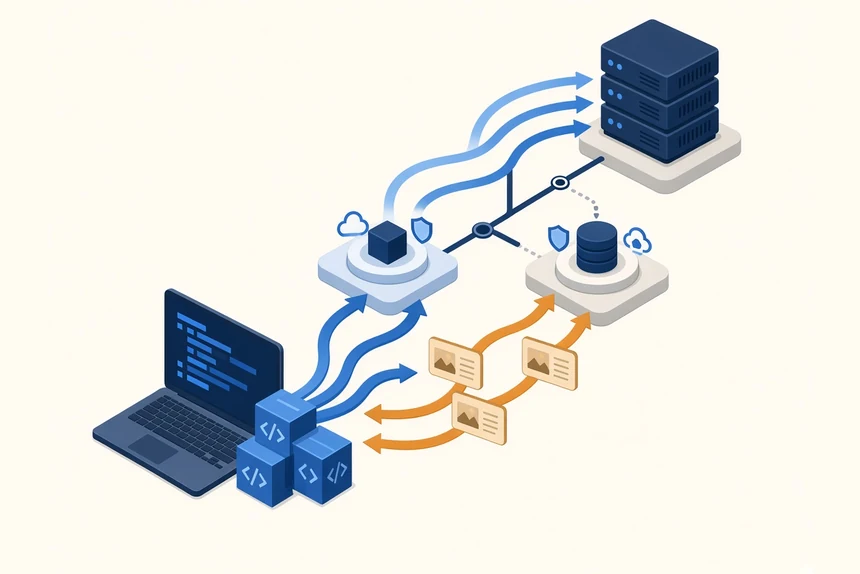
Code forward. Developers build and test locally, push to a shared development environment, then promote to QA and onward. Depending on policy, code may also pass through load testing, staging or user acceptance testing before production.
Content back. In this reference workflow, the documentation says content authors "work almost exclusively in the production environment". In practice that means the production authoring environment, where content can stay in draft or unpublished, be previewed, and go through approval before it goes live. It does not mean editing the live site directly. Where policy allows, production content then flows down to lower environments, so developers build and test against realistic content rather than invented samples. The docs state that content flow from lower environments to higher ones "must be prevented" as this workflow's rule. Teams can still allow controlled exceptions, such as seed or migration content bundled with a release, through a reviewed, explicit process.
This asymmetry is the heart of the pattern. Other platforms and teams may divide the work differently. Code moves up, content moves down, and each moves on its own cadence. Authors don't wait for a code release to publish, and developers don't freeze content to ship a feature.
What makes it work: a shared, versioned repository
The pattern is easiest when code, content and configuration sit in one versioned, distributed repository. The magazine's definition calls for "A Single, Distributed Repository" for code, content and configuration, so teams can package and release related items in one publishing cycle, and for "standard tools and approaches such as branching" to avoid code and content freezes (DevContentOps Explained).
CrafterCMS implements this with Git. Its authoring tool, Crafter Studio, is built around an embedded Git-based content repository. The documentation describes two repository strategies: a single upstream repository with environment branches, which suits most cases, or one upstream repository per environment, which helps when environments differ greatly in size (CrafterCMS DevContentOps docs). In the single-repository layout, branches such as studio-prod, studio-qa and studio-dev back each Studio instance, while prod, qa and dev branches on an external Git server (GitHub, GitLab, Bitbucket or similar) handle code management and promotion. A developer forks dev, works locally, and can start an isolated Studio project from either the shared dev content or their own fork, which carries the latest content brought back from production.
Crafter's own explanation of why it chose Git is in its post on using Git as a content repository. Its argument is that Git's distributed model makes it easier to move content from higher environments to lower ones.
Other platforms, other mechanisms
Git is not the only way to get there. Many headless and API-first CMS platforms separate content into isolated spaces that can be copied or promoted. For example, Sanity's documentation lists operating different environments for testing, staging and production as a typical use of its datasets. Database-backed systems usually rely on export/import or configuration-sync tooling plus content migration scripts.
When you evaluate any platform, focus on the outcome, not the mechanism. Can code and content move independently? Is every change versioned and attributable? Can developers get realistic content without risking production?
An evaluation checklist for web leaders
Use these questions in vendor demos and proofs of concept. Ask to see each one working, not just hear it described.
- Versioning. Is every content change versioned, with history, diff and rollback? Does that include templates and configuration as well as content?
- Environment model. How are dev, QA, staging and production represented? How does a change get promoted, and who approves it?
- Content back. Can developers refresh a lower environment with production content? How is personal or sensitive data handled when you do?
- Developer freedom. Can developers use their own IDE, framework and Git host, or must some artifacts be edited only inside the CMS?
- Pipeline integration. Can your existing CI/CD system trigger, test and promote site changes through APIs or CLI tools?
- Author independence. Can authors publish during a code release without a freeze? Can they preview changes in context before publishing?
- Atomic releases. When a feature needs new code and new content, can they ship together as one unit?
- AI governance. If AI drafts or edits content, or a chatbot reads from the CMS, do those changes and sources follow the same review, versioning and permissions as human work?
- Recovery. How quickly can you roll back a bad publish or a bad deploy, and are the two handled consistently?
Measuring Progress Without Gaming It
Software delivery has a well-established measurement model in DORA's metrics. DORA now uses five: change lead time, deployment frequency and failed deployment recovery time measure throughput, while change fail rate and deployment rework rate measure instability (DORA metrics guide). DORA reports that speed and stability are not trade-offs for most teams, and that the metrics are best applied to one application or service at a time.
These metrics adapt well to a website that combines code and content. Track code deployments as usual, and consider parallel, team-defined measures for content, such as time from approved draft to live, or the share of publishes that need an immediate correction. DORA's own guidance warns against turning metrics into targets, using one metric alone, or comparing unlike teams (DORA metrics guide). Use the numbers to find bottlenecks, not to rank people.
A Practical First 90 Days
Days 1–30: map the current flow. Bring developers, authors and operations together and walk through one recent release that involved both code and content. Where did work wait? Where was content re-entered, frozen or fixed after launch? Record a simple baseline. DORA suggests starting with conversations and its Quick Check rather than building elaborate instrumentation.
Days 31–60: fix the biggest constraint. Common first moves:
- Put templates, components and site configuration under version control with code review.
- Establish a repeatable way to refresh a lower environment with production content, with data masking where needed.
- Add automated checks to the site pipeline, such as build, link and accessibility tests, so promotions are routine instead of risky.
Days 61–90: make releases boring. Practice shipping a feature that needs new code and new content together, without a content freeze. Write down the promotion steps, who approves each one, and how to roll back. Then extend the same rules to AI-assisted content and to any chatbot or agent that reads from the site's content.
Common Pitfalls
- Treating it as a tool purchase. A platform can make the pattern easier, but environments, ownership and approvals are team decisions.
- Letting content flow upward unchecked. Test content leaking into production is a classic failure. Keep authorship in the production authoring environment, behind preview and approval, and route any release-bound content through a controlled exception.
- Locking developers into the CMS UI. If code can only be edited inside the CMS, you lose code review, branching and your existing tooling.
- Exempting AI. AI-generated pages and chatbot answers are content. They need the same versioning, review and accountability as everything else.
The Bottom Line
DevContentOps applies DevOps discipline to the content that websites and digital experiences depend on: one project, defined environments, code forward, content back, and continuous publishing. Teams can get there on several kinds of platforms. CrafterCMS is a clear reference implementation because its Git-based repository and documented code-forward/content-back workflow were designed around this model. Whatever stack you choose, test the checklist above in practice, measure honestly, and make combined code-and-content releases routine.
Source note: Product capabilities described here are based on each vendor's public documentation, as accessed in November 2026.